Before jurispraxis.ai sends a text to an AI model, it replaces the names of people and companies, the identifiers, the phone numbers and the addresses it finds with labels. The model works with the labels. You see the real names — in the answer, in the file and in every export.
How it works
The service checks everything that goes to the model: your question, your uploaded files, the messages of the chat and its drafts. In a chat of a project, it also checks the project’s description, the questions of the project’s other chats and the names of their files, drafts and grids. What the service could not check does not go to the model. Each name it finds gets a label — a word and a number: MAN1, WOMAN2, COMPANY1, IDENTIFIER3. When the model answers, the service puts the real names back, and only then does the answer appear on your screen.
| Step | Text |
|---|---|
| You write | Jan de Vries claims EUR 2,850 from Northwind Logistics B.V. The van was driven by Emma Bakker, an employee. Is the company liable? |
| The model reads | MAN1 claims EUR 2,850 from COMPANY1 B.V. The van was driven by WOMAN2, an employee. Is the company liable? |
| The model writes | Yes. COMPANY1 B.V. is liable for the damage: WOMAN2 was driving for her employer (Article 6:170 of the Dutch Civil Code)… |
| You read | Yes. Northwind Logistics B.V. is liable for the damage: Emma Bakker was driving for her employer (Article 6:170 of the Dutch Civil Code)… |
The labels follow a few rules:
- One person, one label. In one chat, Jan de Vries is
MAN1in every file and every question. Another chat or grid counts its own labels, so the number can be different there. If the service gives one person two labels, you can correct it. - The word shows the gender:
MAN,WOMAN, orPERSONwhen the gender is not clear. The model writes the words around the label to agree with it. - The legal form stays. The label replaces the name only. B.V., Ltd, sp. z o.o. and the like reach the model as written, because the model needs them for its legal reasoning.
Amounts, the dates of events, case numbers and article numbers are not hidden: the model cannot answer without them.
What is hidden
- People — the first name and the surname, written in full, with initials, or as the surname alone.
- Companies — a name next to its legal form: B.V., N.V., V.O.F., Stichting, Ltd, PLC, LLP, GmbH, S.A., SARL, sp. z o.o., Fundacja, OÜ, AS, s.r.o., a.s., d.o.o., d.d. and others. A name without its form is usually hidden when the same chat also writes it with the form.
- Identifiers — IBANs, e-mail addresses, the Dutch BSN, the Polish PESEL, NIP and REGON, the Estonian isikukood, the Czech and Slovak rodné číslo, the Croatian JMBG, Czech bank account numbers, Dutch, British, Polish, Estonian, Czech and Slovak VAT numbers, British National Insurance numbers, and a number that the text names as a KvK number, a KRS number, an IČO, a DIČ, an OIB, a company number, a sort code, an account number or a passport number.
- Phone numbers — Dutch, British, Polish, Estonian, Czech, Slovak and Croatian numbers (+31, +44, +48, +372, +420, +421, +385). Without the country code, an Estonian or Croatian mobile number is hidden too, and so is a number next to the word for phone.
- Addresses — the house number. The street and the city stay visible to the model.
- Date and place of birth, when the text names them as such: “date of birth”, “born on”, “geboren”, “urodzony”, “sündinud”, “narozen”, “narodený”, “rođen”.
What is not hidden
- phone numbers of other countries, for example German or French ones;
- VAT numbers of countries other than the Netherlands, the United Kingdom, Poland, Estonia, the Czech Republic and Slovakia;
- a car registration number;
- a company whose legal form is not in the list above, for example a French SAS;
- in a French text: French identifiers such as a SIREN number, and a date or place of birth written in French.
The service finds names automatically, and it can miss one. The model gets everything the service did not find as it is written. So open an important file and check it.
Where you see it
You open the text of a file with its marks in three ways:
- on the Uploads page, choose Open the text in the menu of the file;
- press Show in the notice that appears when a file is read. The notice says how much the file hides, for example Personal data hidden: 7;
- in a chat, click the name of the file in the top line of an answer. You see the same in the source panel when you open a quoted uploaded file.
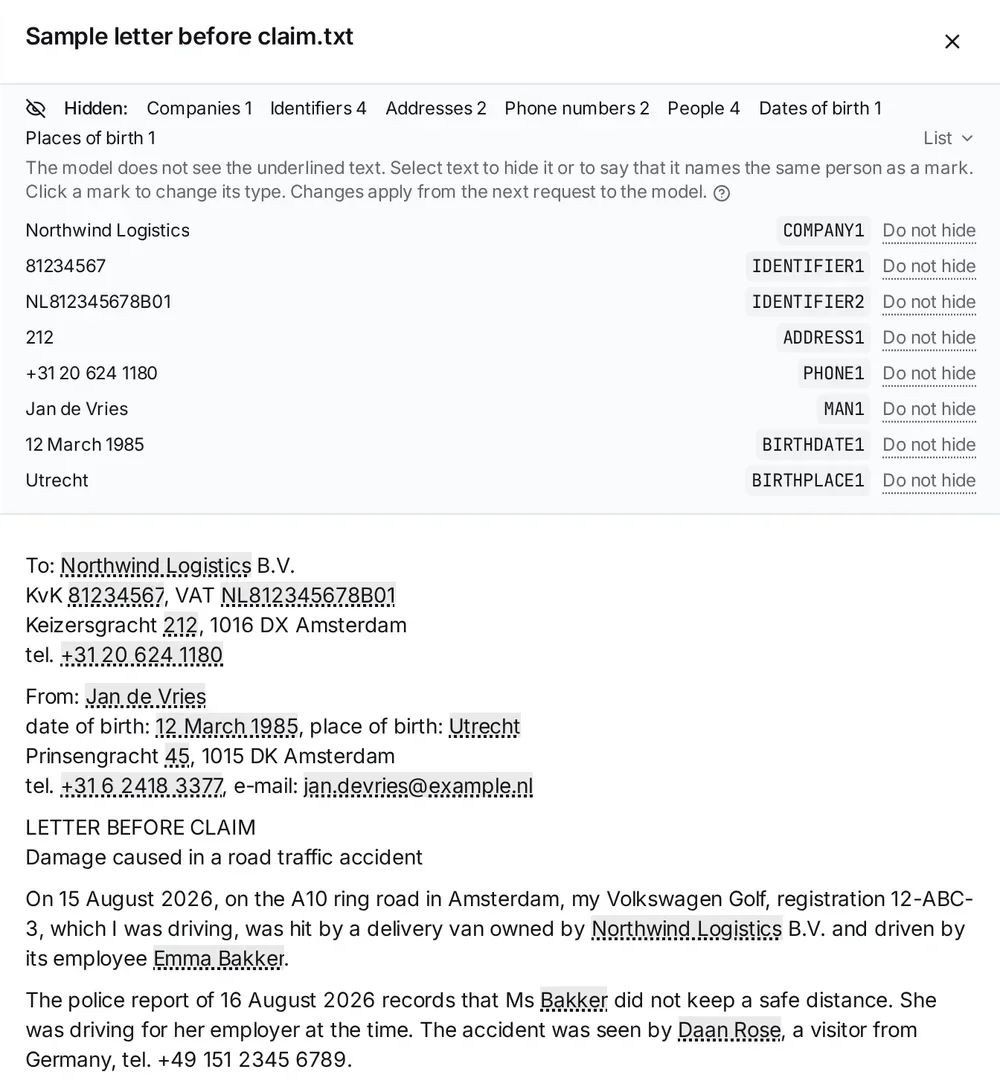
- The Hidden: line counts the people, companies, identifiers and addresses that the model does not see in this file. While the service checks the file, it says “Checking the data…”; when there is nothing to hide, it says “We found no personal data in this file.”
- Text with a dotted underline is text the model does not see.
- List opens every hidden value with its label.
- · by hand: 2 on the line counts the entries changed by hand.
The label number on the Uploads page and in a chat can be different: each chat counts its own.
When the source panel shows a file in translation, the text has no marks. The Hidden: line stays, and the dotted underline shows only when you choose Original. You can still select a missed name and hide it in the translation. See Translated view.
How to correct it
The owner of the file and the administrators of the organization can correct what a file hides. The other members see the marks but cannot change them.
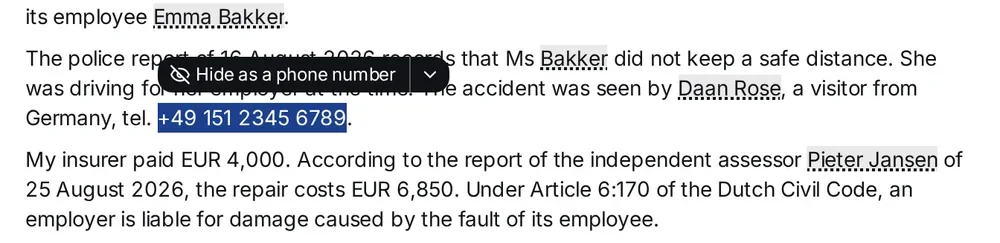
Hide what the service missed. Select the text, and a button appears above it. The service suggests a type: Hide as a person, Hide as a phone number and so on. If the type is wrong, click the arrow next to it and choose another one. Select one name at a time.
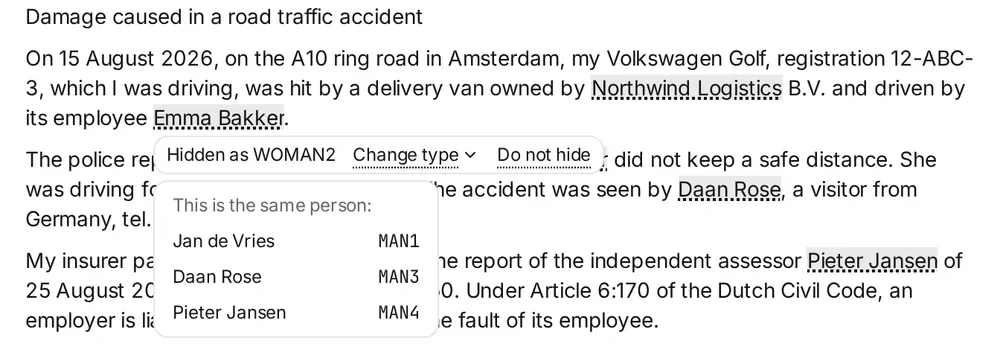
Change the type or show a name. Click an underlined word. You see the label the model reads in that place and two commands: Change type and Do not hide. A name you show stays visible to the model also after the file is checked again.
Set the gender. For a person, Change type and the list next to the Hide as … button have three entries: Man, Woman and Person (gender unclear). The service cannot always tell the gender — “J. de Vries” does not show it — and such a name gets the label PERSON. Choose the gender, and the model writes the words around the label to agree with it.
Say that two spellings are one person. A typo or a poor scan sometimes gives one person two labels. Select the second spelling or click it, and choose the right entry under This is the same person:. For a company the list is This is the same company:. The joined spelling then shows in the menu of the entry under Same person:, and Separate takes it out again.
A correction applies from the next request to the model, in every chat, grid and draft that uses this file. A name you hide in the file is also hidden in your questions in those chats. Answers you already have do not change. The file itself, its text and its exports do not change either: they always hold the real names.
Questions
Does the model provider see my clients’ names? Not the names the service found or the names you hid by hand: the model gets only the labels. A name the service missed reaches the model as it is written.
Why does the answer show real names if the model never saw them? The service replaces the labels with the names before the answer appears on your screen. The model does not know them.
Are grids covered? Yes. In a grid the labels come from the grid’s files. The service does not check the question of a column by itself: a name in it is hidden only when the grid’s files hold that name.
Can I check a question instead of a file? The service checks every question automatically, but it has no view for a question. A name you hide in a file is also hidden in your questions.
Where is the link between labels and names kept? It is not written to the database: the service makes it in memory when it calls the model. The names it finds are stored with the file or the question they come from. For how your data is stored, see Security and your data.