The main difference between jurispraxis.ai and a general AI model is this: its answers stand on documents that really exist, and each conclusion has a direct quotation with a link to its source.
Quotations in the answer
In the text of an answer, the conclusions have numbered references. Press a reference, and the source pane opens on the right. It shows the text of the document, with the passage that the conclusion stands on highlighted.
When a conclusion stands on several quotations in a row, the reference shows a range, for example 3–5. Press it, and it opens into separate numbers; each number opens its own quotation. A number in the range that has no quotation behind it does not show.
A source can be:
- a court decision from the case law of the Netherlands, France or Poland;
- an article of legislation of one of these countries, or, for the Netherlands, a parliamentary paper;
- your own document, if you added it to the chat.
A source in another language can show in its machine translation into the language of your screens. See Translated view.
On the left edge of the pane, a strip of numbers shows all the quotations of the answer. Press a number to go to that quotation.
Below the answer, Sources lists all the documents that the answer cites. Press a document to open it with all the passages that the answer quotes from it highlighted.
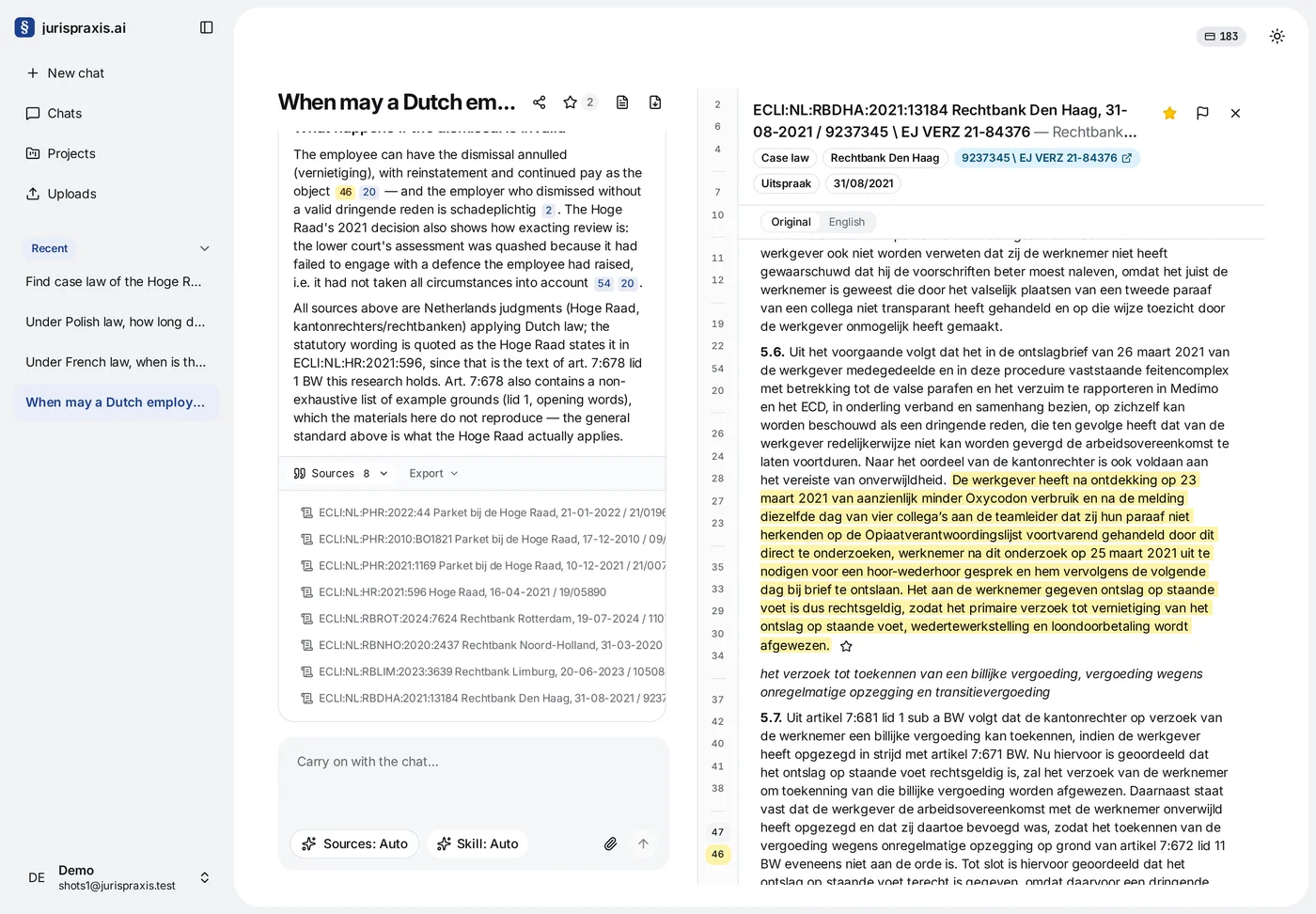
How to open the source document
The top of the pane shows the name of the document and, for a decision, the court. Below the name are the details of the document: the kind of source, the case number, the type of document and the date. If the case number has a link mark, press it (Open the case record) to open the document on the site that publishes it. There you can read the quotation in its full context. This step is important: a holding has meaning only together with the facts of its case.
If a document from the collection has a problem, for example a mistake in the text, the wrong category or a duplicate, press the flag in the pane header (Report a problem). Your message goes to the administrator of the platform.
Why you must check the answer
jurispraxis.ai saves hours of searching, but it does not replace the judgment of a lawyer. Before you use a conclusion in a pleading or an opinion:
- compare the quotation with the source;
- decide if the holding applies to the facts of your case;
- make sure that the provision is still in force and that the decision was not set aside or changed;
- look for later case law on the subject.
Only a person can confirm that a provision is in force, that a decision is still valid and that a case is relevant. jurispraxis.ai gives no legal advice.
How to keep the quotations you need
You can keep a quotation or a document in the Bookmarks of the chat, so that you do not have to search for it again. See Follow-up questions and bookmarks.