Every plan in jurispraxis.ai gives the same app. Plans differ in the credits they give, in the price of an extra credit, and in how soon documents are processed. The free plan, Start, gives 300 credits once, so that you can try the service on a real question. Paid plans are sold by Freemius, our reseller, and only the owner of the organization pays for them.
The same app on every plan
No feature is kept for a larger plan. On every plan you can:
- ask questions about the case law, legislation and parliamentary record of every country that jurispraxis.ai holds, and check each quote against its source;
- attach your own files and ask about them next to the case law;
- make drafts, work in projects and export a chat to Word;
- invite members, give them roles and share chats, projects and files with them.
From one plan to another, three things change: the number of credits, the price of an extra credit, and how soon your documents are processed. On the free plan, large uploads take longer: they wait their turn. On a paid plan, your documents are processed first. See Uploading documents.
Start
Start is the free plan. It gives 300 credits, once.
- The credits are added to the organization that is made with your account, after you confirm your email address.
- An organization gets them one time only.
- They do not expire while the organization stays on Start. In your balance they are the Starter pool.
Where to see your plan
Open Settings and, under Organization, Plans. The owner and the administrators of the organization see this page. A member sees Usage and not Plans.
Each plan has a card. The card of your plan is marked Current. A card shows how many credits the plan gives: Credits, once for Start, Credits a month for a plan that renews each month. It also shows the Extra credit price on that plan.
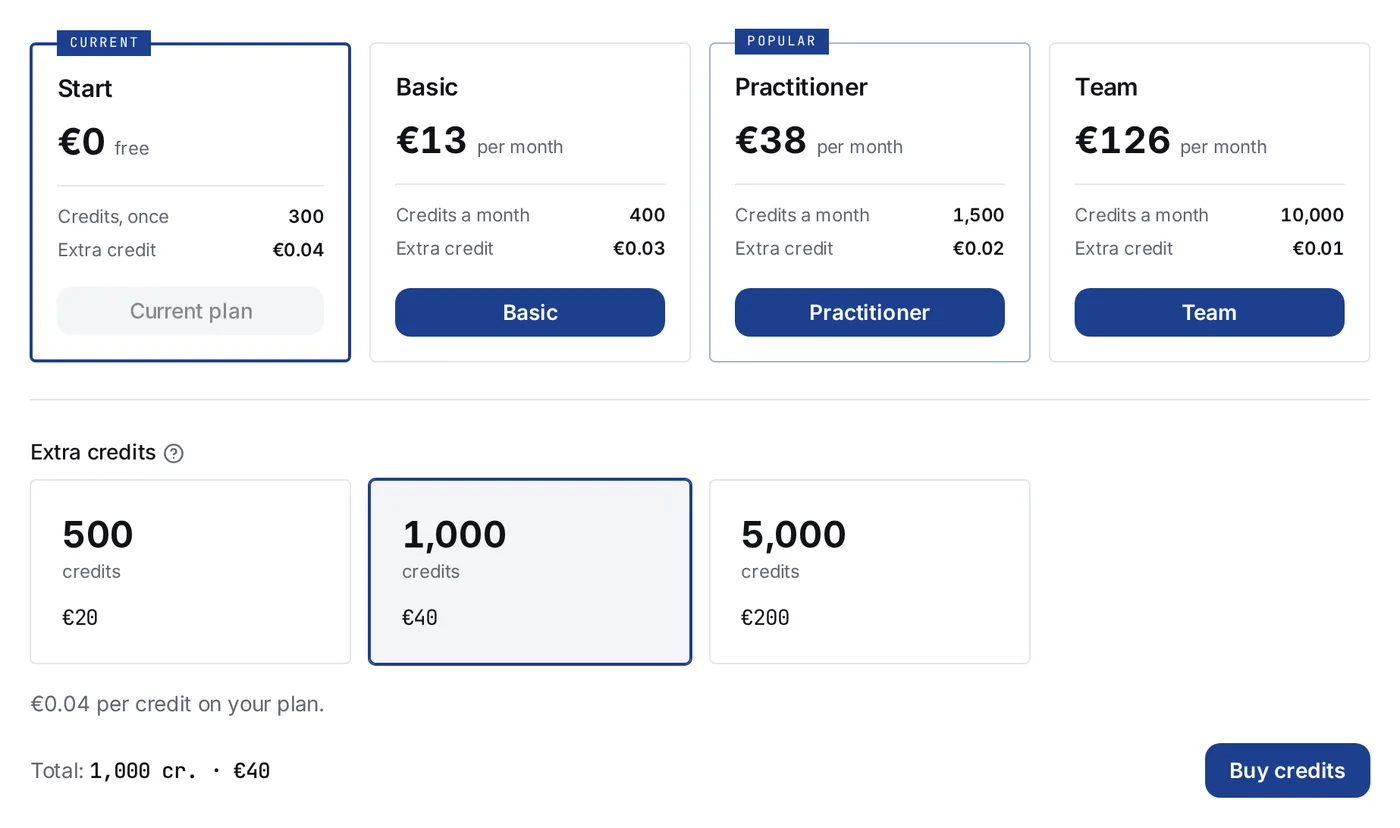
A plan belongs to the organization, not to one person. The balance is shared by every member of the organization.
Who pays
Only the owner of the organization takes, changes and cancels a plan, buys credits and sees the payments. An administrator sees Plans and Billing with the plan and the balance, and reads Only the owner of the organization can manage payments. where the buttons are. See Team: members, roles and invitations.
Our reseller, Freemius, takes every payment. It is the seller of record: it takes the payment, issues the invoice and the receipt, and keeps the subscription. jurispraxis.ai never sees your card.
Taking a plan
- Open Settings → Plans and press the button with the plan’s name, at the bottom of its card.
- Freemius’s checkout opens with the owner’s email already filled in. The email cannot be changed there: it is how the payment finds your organization.
- Pay on that page. Freemius then sends you back to jurispraxis.ai.
The page you come back to says Payment received and that the plan and the credits arrive within a minute. When they are in place, it says All set. If it takes longer than three minutes, it says the credits will appear shortly: look at Billing a minute later.
With the first paid plan, what is left of the Starter credits goes and the plan’s monthly credits come in. The paid period starts on the day of the payment. Each month, when Freemius renews the plan, the monthly credits are given again; what was left of the last month’s expires. See What credits are and how they are spent.
Changing the plan
On a paid plan, open Settings → Plans and press the button of the plan you want, larger or smaller. Freemius’s checkout opens for your subscription. The change takes effect at once, in both directions: there is no waiting for the end of the period, and a new paid period starts on the day of the change.
Freemius takes the unused days of the old plan off the first payment of the new one, but never more than the new plan’s price. On a move to a larger plan you pay the difference. On a move to a smaller plan you pay only what the unused days fall short of the new price, often nothing; what they were worth beyond that price is not paid back in money, it stays with you as credits. The credits you have left are carried over at their worth in money, so that you pay neither twice nor for nothing:
- Each plan has a price per monthly credit: its monthly price divided by its monthly credits.
- The monthly credits you have left are counted in money at the old plan’s price per credit.
- What Freemius took off the new plan’s first payment is subtracted, because you already got that back.
- What remains is counted in credits at the new plan’s price per credit and added to the new plan’s monthly credits.
In practice: if you spent your monthly credits more slowly than the days went by, the new plan starts with more than its monthly credits. If you spent them faster, it starts with fewer, and never with less than zero. Extra credits are not touched by a change.
Manage billing
On Settings → Billing, the owner’s plan card has Manage billing. It opens the Freemius billing portal in a new tab, already signed in. There you:
- cancel the subscription;
- change the card;
- download the invoices.
Under Payment method, the Billing page says only: The card, the invoices and the cancellation are in the billing portal. Manage billing appears once the organization has paid through Freemius.
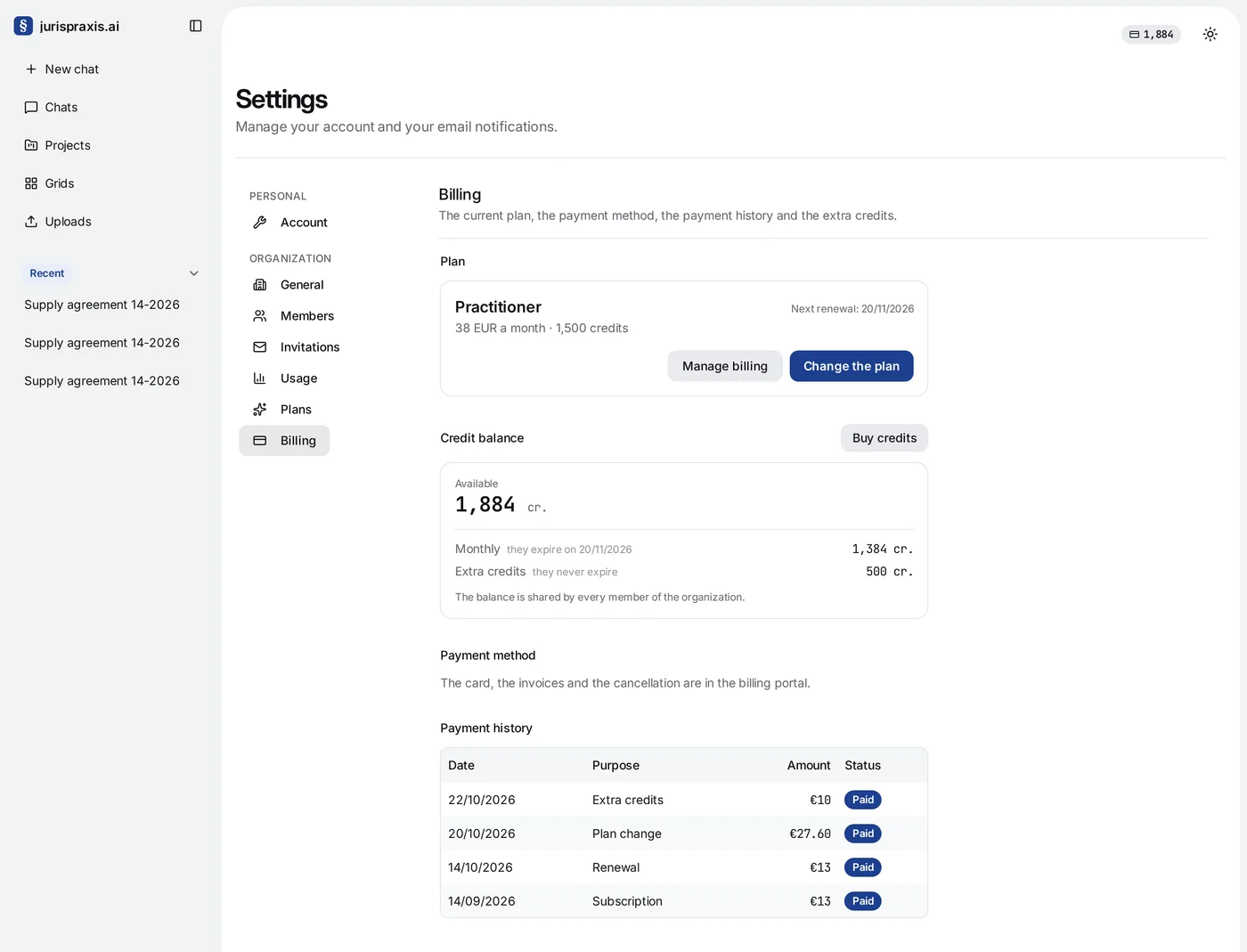
Freemius knows the subscription by the email of the owner who bought it. If that person is no longer the owner, Manage billing gives way to a line naming the email that holds the billing and the address to write to, support@jurispraxis.ai, to move it to you.
Cancelling
Cancel in the Freemius billing portal. The plan stays until the end of the period you paid for: the Billing page marks it being canceled and shows Canceled — good until with the date. Then the organization goes back to Start. The monthly credits go, and the Extra credits stay. A cancel can’t be undone for free: Renew in the billing portal pays for the next month at once, and that month’s credits arrive then, on top of what you have left.
When a renewal fails
If Freemius cannot take the renewal payment, a banner at the top of the app says The renewal payment did not go through. Update the card in the billing portal before the plan lapses. Its Manage billing button opens the portal. Freemius tries the payment again on its own schedule; if it gives up, the organization goes back to Start.
Payment history
Billing lists the organization’s payments under Payment history, with the date, the purpose, the amount and the status. The purposes are Subscription, Renewal, Plan change and Extra credits. A refund is a line of its own, Refund: and the purpose, with a negative amount. Only the owner sees it.
The invoices are in the billing portal, and Freemius mails a receipt for each payment.
Refunds
What can be refunded, and how to ask, is on the Refund policy page.
Prices
This article names no price. The Prices page shows each plan, the credits it gives and the price of an extra credit, in euros.
Credits
Work in the app costs credits. How they are counted, spent and kept, and how to buy extra credits, is in What credits are and how they are spent. Each charge is a line of the usage journal: see The usage journal.