Before you ask, you can choose where jurispraxis.ai looks for the answer. By default the Auto mode searches the collections of every country and decides from your question which of them it needs. You can also choose the countries, their collections and your own files yourself.
Where to choose the sources
Under the question field, press the sources chip. When you have not picked anything, it reads Sources: Auto. The list of sources opens.
The same chip is under the question field on the home page, in a project and in an open chat.
The Auto mode
At the top of the list is the Auto switch: “Search every source you have, on its own.”. It is on by default. With Auto on, jurispraxis.ai searches the collections of every country it holds and decides from your question which of them to search.
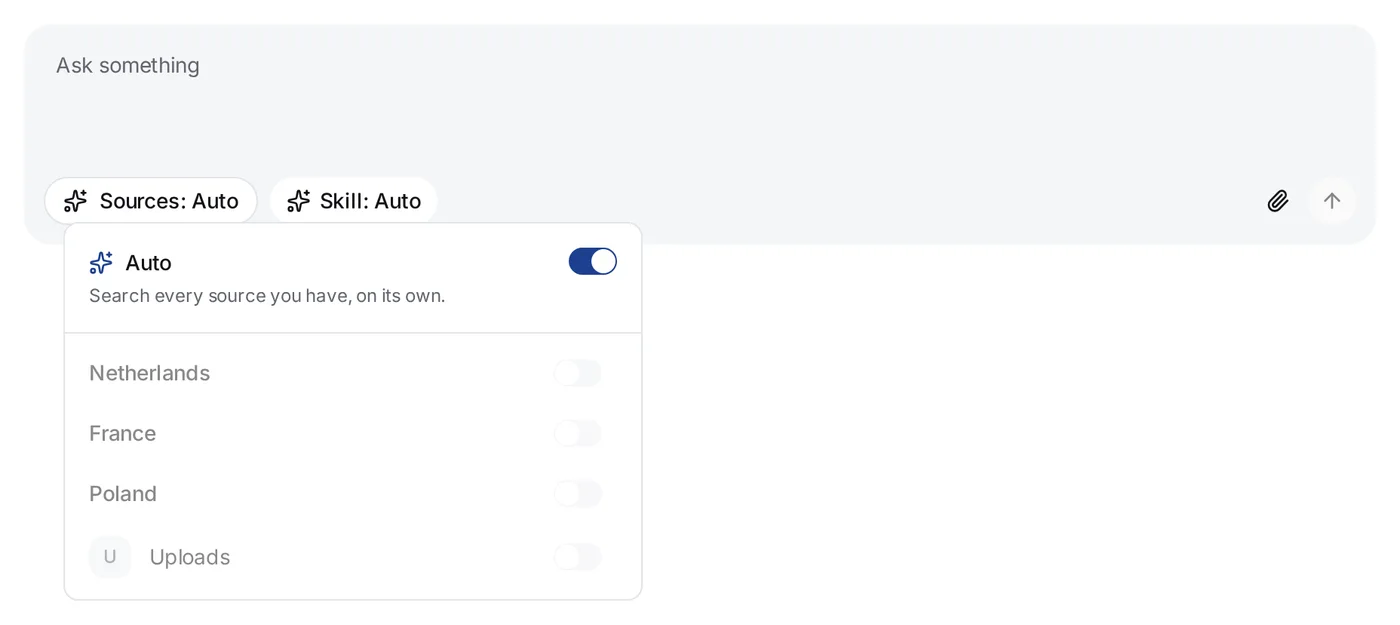
While Auto is on, the other switches in the list cannot be used. Turn Auto off to choose the sources yourself. When you turn Auto on again, your picks and their filters are cleared.
Auto does not read your uploaded files. A file goes into a chat only when you choose it, as the section on your own files below shows.
Countries
jurispraxis.ai holds the law of three countries: the Netherlands, France and Poland. Every organization can search all three. There is no country setting for an organization, and a question costs the same credits whichever country it searches.
The Interface language in your account settings does not choose the country. It changes the language of the screens, not the law that a chat searches.
In the list of sources, each country is a heading with its own switch: Netherlands, France and Poland. Turn a country on, and all its collections are picked and show under it, each with a switch of its own. Turn one collection off to leave it out.
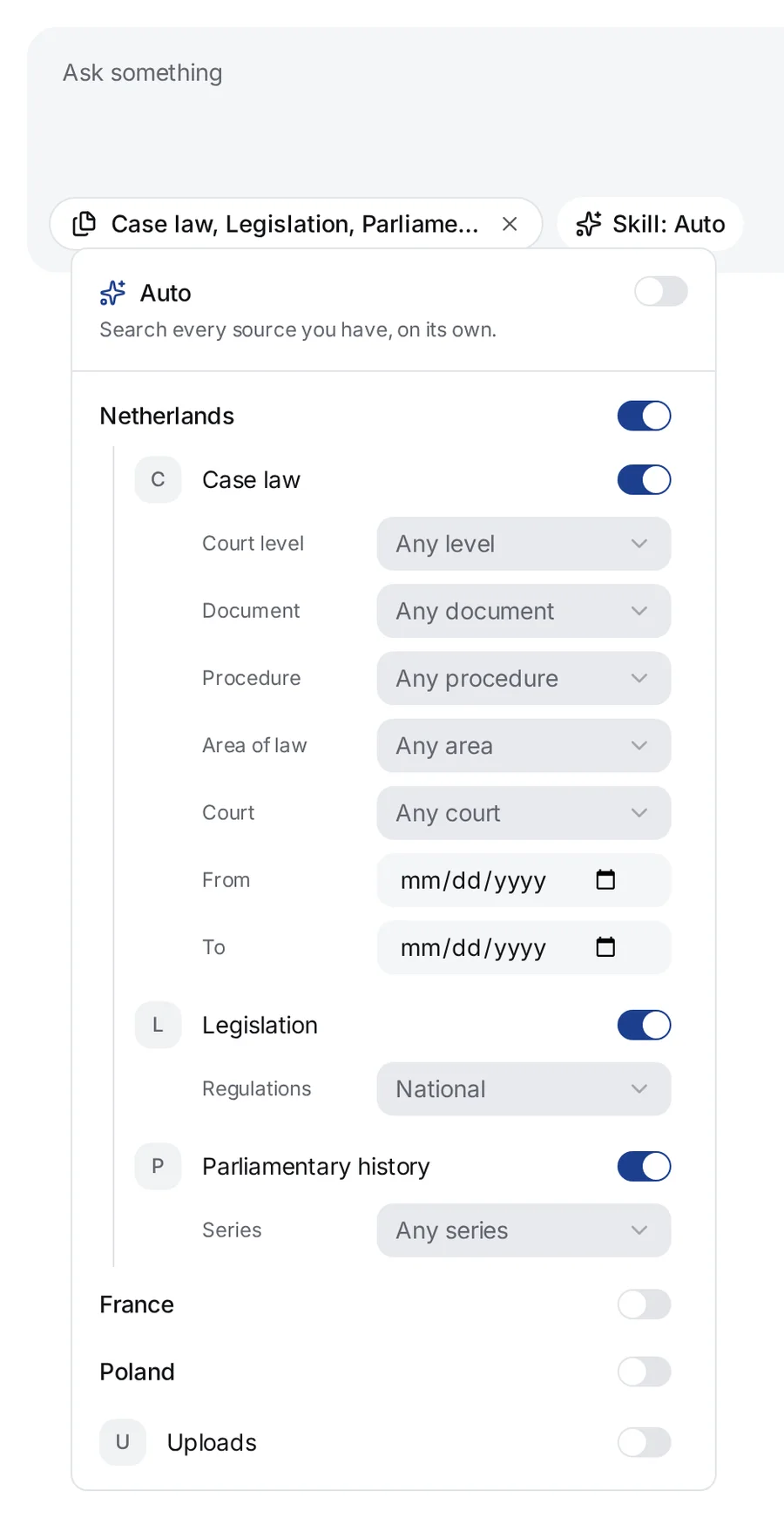
The answer names the country of every source it cites. When the sources in scope belong to a country that your question is not about, the answer says which law they are and that the law of your question was not reached.
What each country holds
Every collection is built from public sources, read through the open data services that publish them.
Netherlands
- Case law — the published decisions of the Dutch courts: the rechtbanken, the gerechtshoven, the Hoge Raad, the Afdeling bestuursrechtspraak van de Raad van State, the Centrale Raad van Beroep and the College van Beroep voor het bedrijfsleven, and the conclusions of the Advocates-General. Each decision is named by its ECLI.
- Legislation — the articles of the national statutes, orders, regulations and treaties in the Basiswettenbestand, each in the latest version jurispraxis.ai holds, and the regulations of municipalities, provinces and water boards. A search reads the national regulations, unless your question is about the rules of one authority or you pick otherwise in the filters.
- Parliamentary history — the papers and proceedings of the Tweede Kamer and the Eerste Kamer (bills, explanatory memoranda, memoranda in reply, parliamentary questions and debates) and the Staatsblad, the Staatscourant and the Tractatenblad.
France
- Case law — the published decisions of both orders of jurisdiction: the Cour de cassation, the cours d’appel, the tribunaux judiciaires and the tribunaux de commerce; the Conseil d’État, the cours administratives d’appel and the tribunaux administratifs; and the Tribunal des conflits. Each decision carries its case number and, when the court gave one, its ECLI. jurispraxis.ai can also start from an article and find the decisions that apply it.
- Legislation — the articles of the codes, lois, ordonnances, décrets and arrêtés in LEGI, with every wording each article has had. jurispraxis.ai reads the wording in force today. When your question is about facts in the past, give their date: jurispraxis.ai then reads the wording in force on that day.
Poland
- Case law — the published judgments of the common courts (the sądy rejonowe, okręgowe and apelacyjne), the Sąd Najwyższy, the Trybunał Konstytucyjny and the Krajowa Izba Odwoławcza, each read from the court’s own site. Each judgment is named by its case number, the sygnatura akt, and its text is published anonymised. The decisions of the administrative courts are not in this collection.
- Legislation — the articles of the acts of the Dziennik Ustaw, as the Sejm’s ELI service publishes them, each from the newest edition of its act that jurispraxis.ai holds. The answer names the edition it quotes. The Monitor Polski is not in this collection, and neither is an act that the Sejm publishes only as a scan, which is most of the older rozporządzenia. An act that is not there is missing from the answer, not from Polish law.
Your own files
In the list, Uploads holds your own files. When you turn it on, the Files for the chat window opens. Tick files, or a whole folder: every processed file in that folder goes to the chat. The chat reads only what you tick. To change the choice later, press Files picked under Uploads. See Attaching files to a chat.
The paperclip in the question field, Add a file, adds a file to what the chat already searches. If the chat was in Auto, the paperclip picks the collections of every country and puts the file next to them, so the case law stays in scope.
When only your files are left in scope, a chip with a plus sign shows next to the sources chip. It names the collections of the countries. Press it to add them back without opening the list.

After you choose
The sources chip now names what the chat searches: the countries and their collections, and the number of files. Hold the pointer on the chip to read “We search here only. The scope holds until you change it.” The choice stays with the chat until you change it.
To go back to Auto, press the cross on the chip.
Tips
- For an answer from your own material only, pick your files and turn the countries off.
- For one country’s law only, turn on that country and nothing else.
- When there are too many results, or they are off the subject, narrow the search with filters: see Case law filters.